Entradas

Mostrando las entradas etiquetadas como ajax

12 jsGrid Particularities

Imagen
 1. Controller - loadData To use controller loadData ensure that  autoload: true, autoload : true , controller : { loadData : function (filter) { return arrData}, insertItem : $.noop, updateItem : $.noop } 2. Creating custom options for every row 1. Create the headerTemplate with buttons "clean" and "execute". 2. Add a "select" with the options 3, Create the itemTemplate 4. Add a textbox (for every row) fields : [ { headerTemplate : function () { return $( "<div>" ).append( $( "<button/>" ) .attr( "type" , "button" ) //.text("Clean") .attr( "data-bs-toggle" , "tooltip" ) .attr( "data-bs-placement" , "top" ) .attr( "title" ,cleanText) .addClass( "text-danger" ) .append( "<i cla...
06. Using ajax (jQuery) to change text in jsp. Language selector. Change event

Imagen
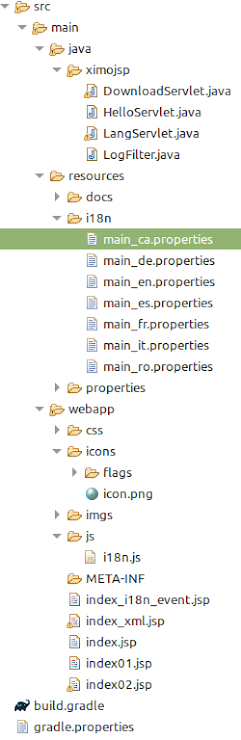
0. Introduction In this blog, it will be seen: 1. Create a "select" for selecting the language 2. Use an icon with the flag of the language 3. Use the change event to trigger a jQuery ajax call to the server 4. Create a js module to store javascript utilities The structure of the project is: The result is: 1. Create a "select" for selecting the language Here is the code (to be inserted in the index.jsp) <select id= " myLanguage " onchange= "changeLanguage()" > <option value= "es" > Español> </option> <option value= "ca" > Valencià </option> <option value= "en" > English </option> <option value= "fr" > Francaise </option> <option value= "de" > Deustch </option> <option value= "it" > Italiano </option> <option value= "ro" > Românesc </option> </select>...