Entradas

Mostrando las entradas etiquetadas como jquery

14 Typescript (2) with jquery, bootstrap and other module stuff

Imagen
1. Introduction Modules are rather tedious and difficult to be understood. There are many module types (Commonjs, AMD, UMD, System) as Jurgen Van Moere explains.  Node, however, works well with Commonjs modules but cannot integrate well with other modules (AMD, System..) Webpack comes to the rescue, but it is a bit difficult to use. With the help of some sites like Neoguias  and  Swashbuckling  this task is much more easier. Our schedule is: Create the basics Create a simple web page with html and javascript Creating a simple module Importing and using a simple node module (is-what) and @types Importing and using jquery 1. The basics. Installation Open VS Code and execute these commands in the terminal window # create the project folder mkdir webpack-jq cd webpack-jq # create the package.json and ask for project basic info npm init -y # install webpack and cli (opt -D is equivalent to --save-dev ) npm i -D webpack webpack-cli # create the folder src (source...

12 jsGrid Particularities

Imagen
 1. Controller - loadData To use controller loadData ensure that  autoload: true, autoload : true , controller : { loadData : function (filter) { return arrData}, insertItem : $.noop, updateItem : $.noop } 2. Creating custom options for every row 1. Create the headerTemplate with buttons "clean" and "execute". 2. Add a "select" with the options 3, Create the itemTemplate 4. Add a textbox (for every row) fields : [ { headerTemplate : function () { return $( "<div>" ).append( $( "<button/>" ) .attr( "type" , "button" ) //.text("Clean") .attr( "data-bs-toggle" , "tooltip" ) .attr( "data-bs-placement" , "top" ) .attr( "title" ,cleanText) .addClass( "text-danger" ) .append( "<i cla...

06. Using ajax (jQuery) to change text in jsp. Language selector. Change event

Imagen
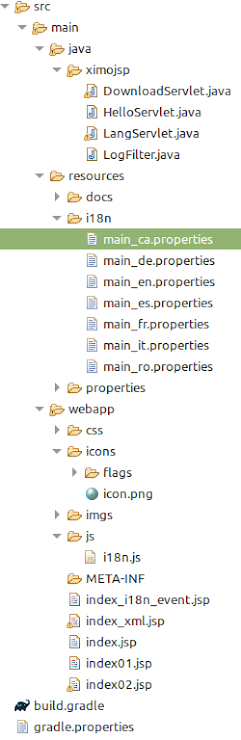
0. Introduction In this blog, it will be seen: 1. Create a "select" for selecting the language 2. Use an icon with the flag of the language 3. Use the change event to trigger a jQuery ajax call to the server 4. Create a js module to store javascript utilities The structure of the project is: The result is: 1. Create a "select" for selecting the language Here is the code (to be inserted in the index.jsp) <select id= " myLanguage " onchange= "changeLanguage()" > <option value= "es" > Español> </option> <option value= "ca" > Valencià </option> <option value= "en" > English </option> <option value= "fr" > Francaise </option> <option value= "de" > Deustch </option> <option value= "it" > Italiano </option> <option value= "ro" > Românesc </option> </select>...