Entradas

Mostrando las entradas etiquetadas como bundle

06. Using ajax (jQuery) to change text in jsp. Language selector. Change event
Imagen
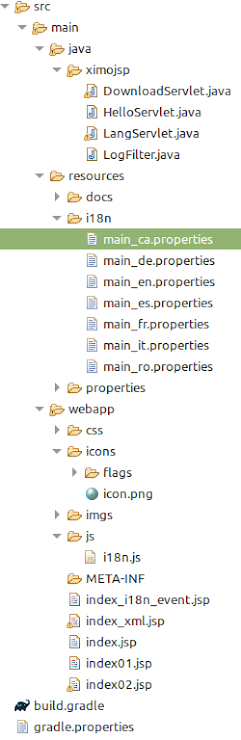
0. Introduction In this blog, it will be seen: 1. Create a "select" for selecting the language 2. Use an icon with the flag of the language 3. Use the change event to trigger a jQuery ajax call to the server 4. Create a js module to store javascript utilities The structure of the project is: The result is: 1. Create a "select" for selecting the language Here is the code (to be inserted in the index.jsp) <select id= " myLanguage " onchange= "changeLanguage()" > <option value= "es" > Español> </option> <option value= "ca" > Valencià </option> <option value= "en" > English </option> <option value= "fr" > Francaise </option> <option value= "de" > Deustch </option> <option value= "it" > Italiano </option> <option value= "ro" > Românesc </option> </select>...
05. Resource bundles (i18n)

Imagen
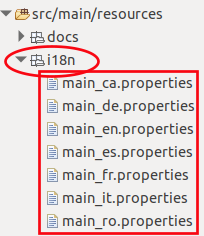
 1. Introduction There are several ways to use resource bundles. By now, let's use  java  instead of xml ( <%@ taglib prefix="fmt" uri="http://java.sun.com/jsp/jstl/fmt" % > ) 1. First lay the resource files ( main _ language .properties ) in the folder  src/main/resources/i18n 2. Create a jsp file 3. Add a new page directive with the includes ( Locale y ResourceBundle ) 4. Get the locale from the request and the resource bundle from the relative path " i18n/main " 5. Assign the localized value using   <%=bundle.getString("key") %> The source code is <%@ page language = "java" contentType = "text/html; charset=UTF-8" pageEncoding = "UTF-8" %> <%@ page import = " java.io.* , java . util . Locale , java . util . ResourceBundle " %> <!DOCTYPE html> <html> <head> <meta http-equiv= "Content-Type" content= "text/html;...